
TI 84 Plus Calculator
A few years ago, we watched a high school student panic before her math exam because she didn’t know how to properly use her calculator. She had the tool in her hands — but not the confidence to use it.
If you are searching for a TI 84 Plus calculator because you’re preparing for SAT, ACT, AP exams, or advanced math classes, this guide is written specifically for you. Whether you’re a beginner learning basic graphing functions or a college student solving complex equations, we’ll walk you through everything you need to know — clearly, practically, and without technical jargon.
Let’s break it down step by step.
What Is the TI 84 Plus Calculator?
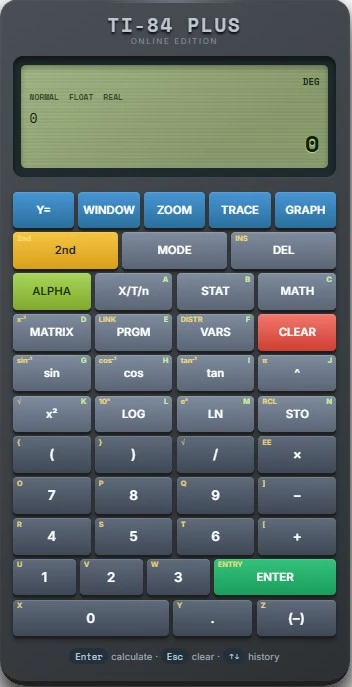
The TI-84 Plus is a powerful graphing calculator designed primarily for high school and college-level mathematics. Manufactured by Texas Instruments, it has become one of the most widely used calculators in classrooms across the United States and beyond.
Unlike basic scientific calculators, this device can:
- Plot graphs
- Solve equations
- Perform matrix calculations
- Run statistical analysis
- Execute programs
- Store data lists
For many students, it becomes more than a calculator — it’s a problem-solving companion.
Who Should Use the TI 84 Plus Calculator?
The TI 84 Plus calculator is ideal for:
High School Students
If you’re taking Algebra II, Precalculus, Trigonometry, or AP Calculus, this calculator helps you visualize equations instantly.
College Students
Engineering, physics, and business students rely on its statistical and graphing capabilities for assignments and exams.
Standardized Test Takers
It’s approved for most major exams, including:
- SAT
- ACT
- AP Exams
If you’re preparing for these tests, learning this calculator can save you precious minutes during the exam.
Key Features That Make It Stand Out
Let’s explore why the TI 84 Plus remains so popular.
1. Advanced Graphing Capabilities
You can plot multiple equations at once and visually compare functions. This is extremely helpful when analyzing quadratic, exponential, or trigonometric functions.
2. Built-In Statistical Tools
From linear regression to standard deviation, the calculator simplifies data analysis — perfect for AP Statistics or business math courses.
3. Equation Solver
You can solve polynomial equations quickly without manually rearranging expressions.
4. Programmability
Students and teachers often create custom programs to automate repetitive calculations.
5. Durable & Exam Approved
It’s built to last and is accepted in most standardized testing environments.
How to Use TI 84 Plus Calculator (Beginner Basics)
If you’re new to this device, start with these essentials:
Entering Expressions
Type your equation using parentheses correctly. The order of operations is automatically applied.
Graphing a Function
- Press the Y= button
- Enter your function
- Press GRAPH
Within seconds, you’ll see a visual representation of your equation.
Finding the Intersection
Use the CALC menu to locate exact intersection points between curves — extremely useful in calculus problems.
TI 84 Plus vs Scientific Calculator – What’s the Difference?
Many students ask whether a graphing calculator is necessary.
A standard scientific calculator can:
- Perform arithmetic
- Handle trigonometric functions
- Compute logs
However, it cannot:
- Plot graphs
- Store lists of data
- Perform regression analysis
- Solve complex equations visually
If your coursework involves graphs or advanced algebra, the TI 84 Plus calculator is a major upgrade.
Common Problems & Quick Fixes
Even experienced users run into small issues.
Calculator Not Turning On
Replace the AAA batteries and check the backup battery.
Memory Error
Clear unnecessary programs or reset RAM.
Graph Not Displaying Properly
Adjust the WINDOW settings to correct the viewing range.
Small adjustments can solve most problems quickly.
TI 84 Plus CE vs TI 84 Plus – Which One Should You Choose?
The TI-84 Plus CE is the upgraded version.
Main differences:
- Color display
- Rechargeable battery
- Slimmer design
- Faster processor
If you prefer a modern interface and portability, the CE version is worth considering. If budget matters more, the original TI 84 Plus calculator still performs excellently.
Benefits of Mastering Your Calculator Early
When we work with students, we notice something important: those who practice calculator skills early feel more confident during exams.
You gain:
- Faster problem-solving speed
- Better graph interpretation
- Reduced exam anxiety
- Higher accuracy in calculations
It’s not about pressing buttons — it’s about understanding what the calculator is doing.
Related Search Terms & Long-Tail Queries
Students often search for:
- How to use the TI 84 Plus calculator for calculus
- TI 84 Plus graphing functions tutorial
- best calculator for SAT math
- TI 84 Plus equation solver steps
- graphing calculator for high school students
- TI 84 Plus vs TI 83 comparison
- programming on TI 84 Plus
- TI 84 Plus Statistics Mode Guide
If you’re looking for any of these, mastering this device will directly support your academic success.
Is the TI 84 Plus Calculator Worth It?
If your coursework includes graphing, statistics, or advanced algebra, absolutely.
While there are calculator apps available today, many exams require a physical device. The TI 84 Plus remains reliable, trusted, and widely accepted in educational institutions.
For serious math students, it’s not just a purchase — it’s an investment.
TI 84 Plus Online Calculator Kuwait
The TI 84 Plus Online calculator Kuwait, has stood the test of time for a reason. It combines reliability, advanced functionality, and exam compatibility in one compact device.
If you’re preparing for standardized tests, tackling higher-level math, or teaching students who need dependable tools, this calculator continues to be one of the smartest choices available.
The key isn’t just owning it — it’s learning how to use it effectively.